Lojisel ngir atelier defar ak liggéeyu service
Mu ngi ci BelloPOS Pro
Téléphone bu ñu bàyyi ngir defar, rendez-vous coiffure ci 10i waxtu, ndox muy tuuru ci kër kiliyaa: benn fiche ci bépp liggéey, benn numéro, dara du réer.
Yebbi ci dara ngir Windows · ñu ngi seet version bu mujj bi… · dafay dox te amul internet
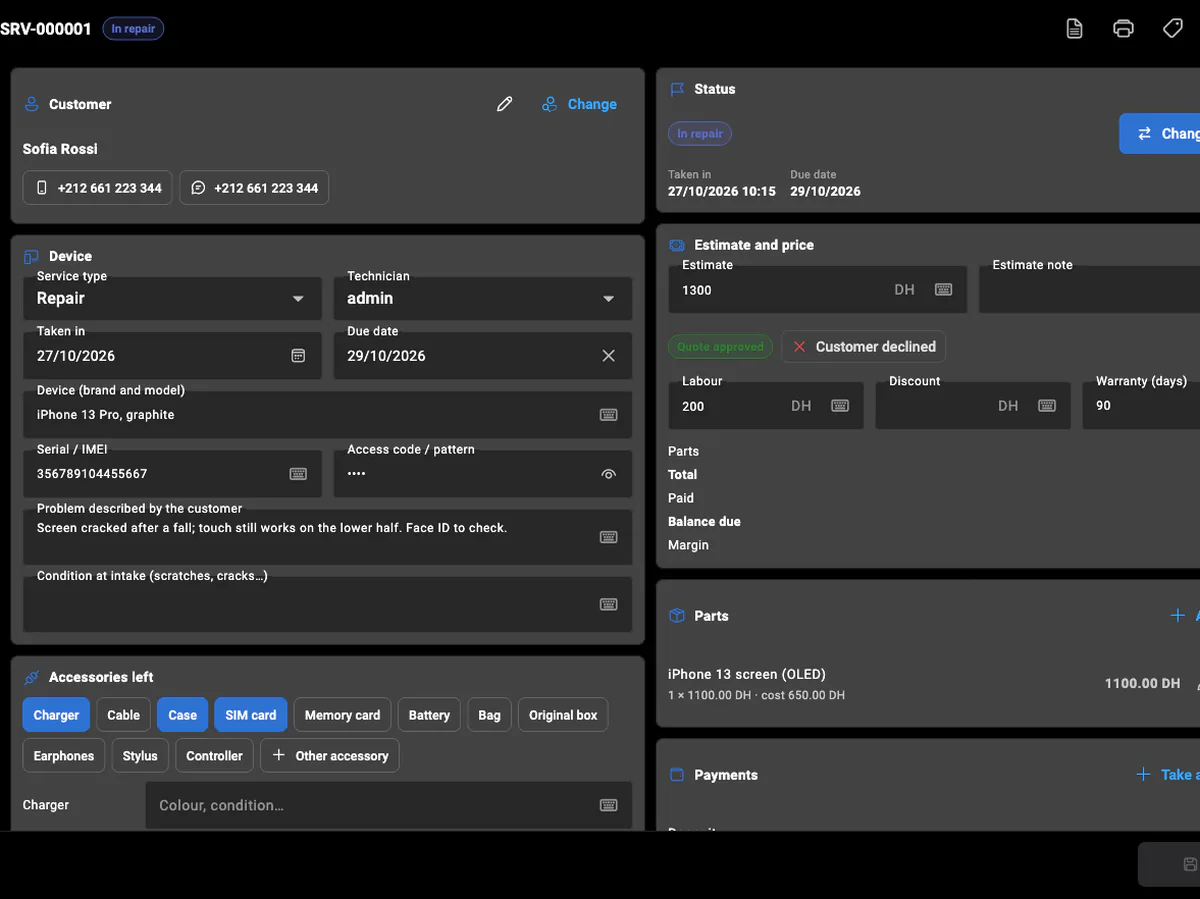
Liggéeyu service du jaay produit: dafay jël lenn, jël ab waxtu walla dem ci ab adresse, te matal liggéey bi. BelloPOS Services dafay jox bépp liggéey fiche bu am numéro: kiliyaa bi ak ay téléphoneem (WhatsApp ci biir), li mu bàyyi ak li ànd ak moom, jafe-jafe bi ni mu ko waxe, devis bi ak tontoom, pièce yi ñu jëfandikoo, avance bi ak fey yi. Bépp soppi statut dafay des ci tariixu fiche bi, kon képp ku nekk ci comptoir bi man nga tontu "ana sama téléphone?" ci ay saa yu gàtt.
Dañu ko taxawal ngir sa mecce: defar électronique, téléphone ak òrdinatëer, garage, pressing, salon rafetal, plombier, électricien, setal, raxas oto, serrurier, climatisation, tëgg, rey gunóor, toxu, liggéey loxo, topptoo mala yi ci kër gi, livraison, setal tapis walla tool. Benn-benn am na champ yi mu soxla (plaque ak kilométrage ngir oto, étiquette ak limu yére yi ngir pressing, adresse ak bésu ñëw ngir plombier) ak ay statutam. Services ñu ngi ci BelloPOS Pro ak Pro+, ak seen onglet ak seen tablo, wuute ak say jaay; xaalis bu ñu jot dafay dugg ci benn tiroir-caisse bi.
Li muy def
Benn fiche ci benn liggéey
Fiche bu am numéro ak kiliyaa bi, li ñu jël, numéro de série walla plaque bi, code bi (nëbbu, duñu ko imprimer mukk), jafe-jafe bi, ni mu nekke bi ñu ko jotee ak accessoire yi ñu bàyyi ak moom.
Devis, pièce ak fey
Yónnee devis te bind tontu bi, yokk pièce yu jóge ci sa lim (stock bi dafay wàññiku bu ñu leen jëfandikoo), jël avance, te jël li des bi kiliyaa bi ñëwee jël.
Reçu ak étiquette yu ñu imprimer
Imprimer reçu kiliyaa bi ak code-barres ak QR code bu numéro bi, ak étiquette buy taq ci li ñu jël. Tànnal li benn-benn di imprimer ci paramètres yi.
Pare na, jox nañu ko, ci garanti
Xamal kiliyaa bi ne pare na ci WhatsApp ci benn bës. Jox ko dafay tàmbali garanti bi, te numéro de série walla plaque bu dellusi dañu koy xam ni dellu ci garanti.
Calendrier ñëw yi ak bés yu ñu dige
Rendez-vous, ñëw ak bés yu ñu dige ci weer, ayu-bés walla bés, ngir benn technicien walla benn statut, ak liggéeyu benn-benn technicien ci bés bu nekk. Diri fiche bi ci beneen waxtu ngir soppi ko; soppi bi dafay des ci tariixam.
Facture ngir liggéey bi
Génne facture ci fiche bi, ak numéro ci série bu bopp (FS-2026-000001), ak TVA bu xeetu service bi ak total bi ci baat. Bu ñu ko génnee, du soppiku mukk; avoir moo koy neenal.
Gis ko ci app bi
Écran yu dëgg yu BelloPOS ci Windows.
Ni muy doxe, tappaliku ak tappaliku
- 1Jël li ñu la indil: tànn walla sos kiliyaa bi, wax appareil bi walla liggéey bi, màndargaal li ñu bàyyi ak moom.
- 2Imprimer reçu bi ngir kiliyaa bi ak étiquette bi ngir li ñu jël.
- 3Seet jafe-jafe bi, yónnee devis bi te bind ndax kiliyaa bi nangu na ko.
- 4Defar: yokk pièce yi ñu jëfandikoo te yóbbu fiche bi ci say statut.
- 5Màndargaal ne pare na te yónnee message WhatsApp bi, te jël li des ci xaalis bi te delloo ko.
Laaj yi jaaykat yi di laaj
Ban plan moo am Services?
BelloPOS Pro ak Pro+. Dafa fey ba nga koy taal ci Paramètres → Services, walla nga wax ci installation bi ne yaa ngi jox ay service. 7 bés yi ngir jéem ci dara dañu ko dugal.
Ndax defar dañu koy limaale ni jaay?
Déedéet. Services am nañu seen onglet, seen fey ak seen tablo, kon say limu jaay dañuy set. Kiliyaa yi benn lañu, te xaalis bu ñu jot ngir defar dafay dugg ci benn tiroir-caisse bi, kon lim bi ci njeexitalu bés bi dafa jub.
Ndax ngir defar téléphone rekk la?
Déedéet. Am na 19 mecce, dale ko ci garage ak pressing ba ci salon, plombier ak ñiy toxal. Benn-benn dafay indi ay champam, ay statutam ak ay limam, te man nga soppi tur walla yokk statut, xeeti service ak accessoire ci Manage.
Ndax man naa topp stock bu sama pièce yi?
Waaw. Bépp pièce man na topp stockam ak ab lim bu njëkk ak ab lim bu gën a tuuti. Yokk ko ci fiche dafay génne ko ci stock bi; dindi ko walla neenal liggéey bi dafay delloo ko. Pièce yi bëgg a jeex dañuy feeñ ci tablo bi.
Ndax dafay dox te amul internet?
Waaw, ni BelloPOS yépp: fiche yi ñu ngi ci sa òrdinatëer walla sa tablette, te ay caisse yu bari ci réseau bi dañu leen di bokk.
Ndax technicien yi mën nañu liggéey ci seen téléphone?
Waaw, ak application téléphone bu liggéeykat yi bi nekk ci Pro. Ci Wi-Fi bu bitig bi, technicien bi dafay ubbi onglet Services ci téléphoneem ngir jël appareil, yokk nataal yu jóge ci kamera bi, soppi statut bi, yokk pièce ak fey, bind tontu devis bi te imprimer fiche bi walla étiquette bi ci imprimante caisse bi. Lépp dañu koy bind ci turam, ci biir sañ-sañu rolam.
Ndax mën naa def facture ngir ab defar?
Waaw. Bouton Facture bi ci fiche bi dafay génne facture ak numérotation bu bopp, wuute ak say facture jaay. Dafay dindi TVA ci total fiche bi ci taux xeetu service bi, te dafay imprimer total bi ci baat fu sa réew laaj ko. Ngir jubbanti benn, génne avoir te defaatal facture.
Ndax mën naa yokk sama champ yu bopp ci fiche?
Waaw. Ci Gestion → Champs de service, yokk li sa mecce soxla (melo, déclaration assurance, tollu jaaro…) ni mbind, lim, bés, waaw/déedéet walla lim tànneef, ngir xeeti service yépp walla yenn yi rekk. Ab champ mën na nekk lu war, ñu imprimer ko ci fiche dugal bi, te mën nañu ko seet.
Yeneen li BelloPOS man
Bépp module, benn xët ngir ku nekk.
Lojisel POS bu écran tactile
Ekraanu caisse bi sa liggéeykat yi dinañu ko jëfandikoo dëgg: benn bës ci écran ci benn marsandiis, benn saa ci benn fey, te dara du xaar internet.
Lojisel jëwrin stock
Bépp jaay ak bépp livraison dafay yëngal lim bi, kon li écran bi wax mooy li nekk dëgg ci etaasëer bi.
Lojisel code-barre ak étiquette
Bépp scanner dafay dox ci saa si, te lu amul code-barre dina am bu nga imprimer sa bopp.
Lojisel facture ak reçu
Tike thermique ngir ñiy xaar, facture PDF bu jub ngir kiliyaa bi ko laaj, ñoom ñaar ñépp bawoo ci menn jaay bi.
Lojisel jëwrin kiliyaa
Xam ki nekk ci sa kanam, li mu jënd ci yoon wi weesu, ak detay yi facture bi ci topp di soxla.
Crédit kiliyaa ak relevé compte
Tegal limite bi balaa jaay bi, topp bépp bor ak bépp fey, te jox kiliyaa bi ab relevé bu lim yi dëppoo.
Lojisel jënd ak fournisseur
Bindal li agsi ak li nga fey, te bàyyi stock bi, njëgu jënd yi ak historique fournisseur bi ñu soppiku ñoom ñépp ci benn yoon.
Lojisel rapport jaay
Li jaayu, li jur, ku ko jaay ak lu nga war a komande ci topp, te doo exporter dara ci benn tableur.
Lojisel POS restaurant
Saal bi, pass bi ak addition bi ci benn système, buy dox ba tey su internet bi dee ci digg service bi.
Lojisel POS bu soxlawul internet
Du ab mode hors ligne buy dabaat ginnaaw: lojisel bi dafay dox rekk fa sa bitig nekk.
Lojisel POS bu ay caisse yu bari
Benn PC moo yor données yi, yeneen terminal yi dañuy waxtaan ak moom ci sa réseau ci sa bopp, te dara du génn ci kër gi.
Compte liggéeykat ak sañ-sañ
Ku nekk am sa login, bépp rôle am bouton yi mu war a am rekk, te historique bi dafay wax ku def lan.
Lojisel ngir atelier defar ak liggéeyu service
Tàmbalil tey te boole sa njaay yépp ci benn plateforme.