BelloPOS ngir sa liggéey
POS bu amul fey ngir bitigu koñ ak jaay bu yaatu
Lekk-lekk, naan, pil ak crédit téléphone: caisse bu gaaw ngir bitig buy jaay tuuti ci lépp.
Yebbi ci dara ngir Windows · ñu ngi seet version bu mujj bi… · dafay dox te amul internet
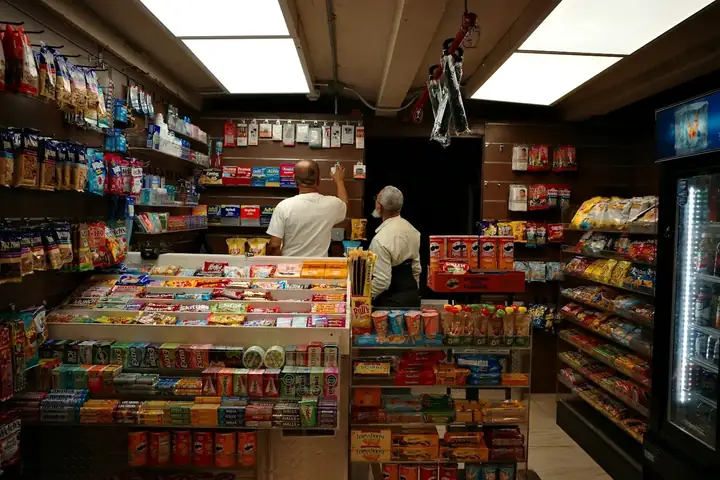
Bitigu koñ dafay jaay téeméeri mbir yu ndaw ci nit ñu yàkkamti. BelloPOS dafay leen dugal ak scanner code-barre walla benn bës ci grille bi, dafay boole panye bi ak taxe bu jub ci bépp liñ, te dafay imprimer tike bi ci saa si. Dafay dox ci PC Windows walla Mac bu ñépp te dafay wéy di jaay te amul internet benn yoon.
Tànnal "Bitig ak jaay bu yaatu" ci installation bi te base de données démo bi dafay fees ak lekk-lekk, naan, jumtukaayu kër ak accessoire, ak tur ci sa làkk ak njëg ci sa xaalis, kon bitig bi dafay mel ni sa bos ci simili bu jëkk bi. Alerte stock bu wàññiku yi dañu lay wax lu nga war a komandewaat balaa etaasëer bi di dóor.
Li ngay am
Scanne walla bës, te fey
Bépp scanner code-barre USB dafay dox ci saa si, te marsandiis yi amul code-barre ñu ngi ci benn bës ci grille bi.
Alerte stock
Tegal benn minimum ci bépp produit te gis li di jeex balaa gaawu-gaawu weekend bi, du ginnaaw.
Étiquette code-barre
Imprimeel say étiquette ngir marsandiis yu ñuy jaay ci lu wàcc walla yu amul étiquette, ak tur ak njëg, ci menn app bi.
Xam sa marsandiis yi gën a jaay
Rapport yi dañuy wone li jaayu, li des ci etaasëer bi ak marge bu ci nekk, kon ngay jënd ci lim yi, du ci aada.
Gis ko ci app bi
Écran yu dëgg yu BelloPOS ci Windows.
Sa katalog démo, pare ci installation bi
Tànnal liggéey bii boo di installer BelloPOS te kategori ak produit yii dañu leen lay defaral, ci sa làkk ak sa xaalis. Soppi seen tur, seen njëg walla far leen saa su la neexee.
- 1Installer BelloPOS te tànn sa làkk ak sa réew.
- 2Tànnal "Jéem ak données démo", te nga tànn sa liggéey.
- 3Tàmbali jaay ci katalog bu jëkk a mel ni sa bitig.
Bitig ak jaay bu yaatu
4 kategori · 17 produit
Snacks and sweets
- Crisps 150 g$ 0,90
- Chocolate bar$ 0,60
- Filled biscuits$ 0,50
- Chewing gum$ 0,30
Drinks
- Water 50 cl$ 0,30
- Soda can$ 0,70
- Energy drink$ 1,50
- Fruit juice 25 cl$ 0,50
Household
- AA batteries x4$ 2,50
- LED bulb$ 2,00
- Bin bags x20$ 1,20
- Lighter$ 0,50
- Sponges x3$ 0,80
Accessories
- USB charger$ 4,50
- USB-C cable$ 3,00
- Phone top-up card$ 2,00
- Folding umbrella$ 5,00
Njëg yi ay misaal lañu ci dolaar amerikeen; app bi dina leen weccit ci sa xaalis.
Yebbi léegiNi njaay di doxe
- 1Scanne marsandiis yi walla bës ci ñoom ci grille produit bi.
- 2Total bi dafay feeñ ak taxe ci bépp liñ; jël xaalis walla kart.
- 3Imprimeel tike bi te tiroir bi dafay ubbiku ci fey xaalis.
- 4Stock bi dafay wàññiku ci bépp jaay te marsandiis yu wàññiku yi dañu leen di màndargaal.
- 5Tëjal bés bi te seet rapport marsandiis yi gën a jaay.
Laaj yi jaaykat yi di laaj
Ban scanner code-barre lay dox?
Bépp scanner USB walla Bluetooth buy bind ni klawiye, te loolu ñoom ñépp lañu lu jege. Soxlawul driver walla configuration.
Ndax mën naa ko jéem ak produit yu bitig yu ñépp?
Waaw. Ci installation bi tànnal "Jéem ak données démo", te "Bitig ak jaay bu yaatu", te BelloPOS dafay sos katalog bu pare ak lekk-lekk, naan ak marsandiis yu bés bu nekk.
Ndax amul fey dëgg?
Plan Lite bi licence bu fàww la bu amul fey ak caisse, reçu, code-barre ak stock. Plan yu gën a mag dañu leen di jaay ba fàww walla weer ak weer, te dara du yeesalu ci boppam.
Yeneen liggéey
Lépp li BelloPOS manRestaurant
Taabal yi, waañ wi ak serwiis bu gaaw.
Café ak bitigu kafe
Komand yu gaaw, comptoir bi ak terrasse bi.
Supermarché ak bitig
Code-barre, stock ak caisse yu fees.
Boulangerie ak pâtisserie
Natt, jaay te topp mburu yu bees yi.
Mood ak yére
Taille, wuute yi ak koleksiyoŋi jamono.
Rafetaay ak cosmétique
Marque yi, testeur yi ak kiliyaa yu dëggu yi.
Bar ak lounge
Tour yi, kont yu ubbiku ak comptoir bu fees.
Boucherie
Jaay ci kilo, dog bu nekk.
Parapharmacie
Dermo-cosmétique, toppatoo xale yu ndaw ak compléments.
Papeterie ak jumtukaayu lekool
Ubbiteg lekool, produit ak produit.
Électronique ak téléphone
Téléphone, accessoire ak ticket yu njëg ju kawe.
Électroménager
Njaay yu njëg ju kawe, avance ak livraison.
Bitigu meubles
Njaay ci showroom, avance ak komand.
Pièces auto
Junniy référence, ñuy gis ci ay saa.
Quincaillerie
Junniy jumtukaay yu ndaw, njëgu boroom liggéey ak kont.
Bitigu téléphone
Téléphone, accessoire, defar ak téereb kiliyaa.
Bitigu dàll
Bépp pointure ak bépp kulëer ak stockam.
Bitigu fowukaay
Caisse bu gaaw ngir mbëmbëmu bés yu mag yi.
Bitigu mala
Ñam ci saaku walla ci kilo, kiliyaa yu dëggu.
Opticien
Monture yu nekk ci stock, komand yu ñuy topp, avance ci kont.
Bijouterie
Bépp bijou ñu waññi ko, fey ci ay yoon, saytu bu mat.
Bitigu sport
Taille, njëgu club ak kont.
Fast food
Komand yu gaaw ci comptoir, écranu waañ, livraison.
Pizzeria
Lekk fi, yóbbu walla livraison, ak note ngir waañ wi.
Defar téléphone ak òrdinatëer
Fiche defar, IMEI, devis, pièce ak garanti.
Defar électroménager
Ci atelier bi walla ci kër gi, ak ñëw yi ci calendrier.
Garage
Fiche ak plaque, kilométrage, pièce ak mécanicien.
Raxas oto
Rendez-vous walla ñu ñëw rekk, plaque ak taille oto.
Pressing ak blanchisserie
Étiquette, limu yére, tàq ak jëlaat.
Salon coiffure ak rafetal
Rendez-vous ci bépp coiffeur, allergie ak produit yi ñu jëfandikoo.
Plombier ak électricien
Laaj, ñëw, technicien ak facture.
Entreprise setal
Liggéey ci surface ak néeg, ekip yi ci calendrier.
Tëgg
Jubbanti yére, natt ak essayage.
Toppatoo mala yi
Rendez-vous, fichu mala bi ak denc ko.
POS bu amul fey ngir bitigu koñ ak jaay bu yaatu
Tàmbalil tey te boole sa njaay yépp ci benn plateforme.