BelloPOS for your trade
Software for cleaning businesses
Homes, offices and building sites: every visit planned, done and paid.
Free download for Windows · checking the latest release… · works offline
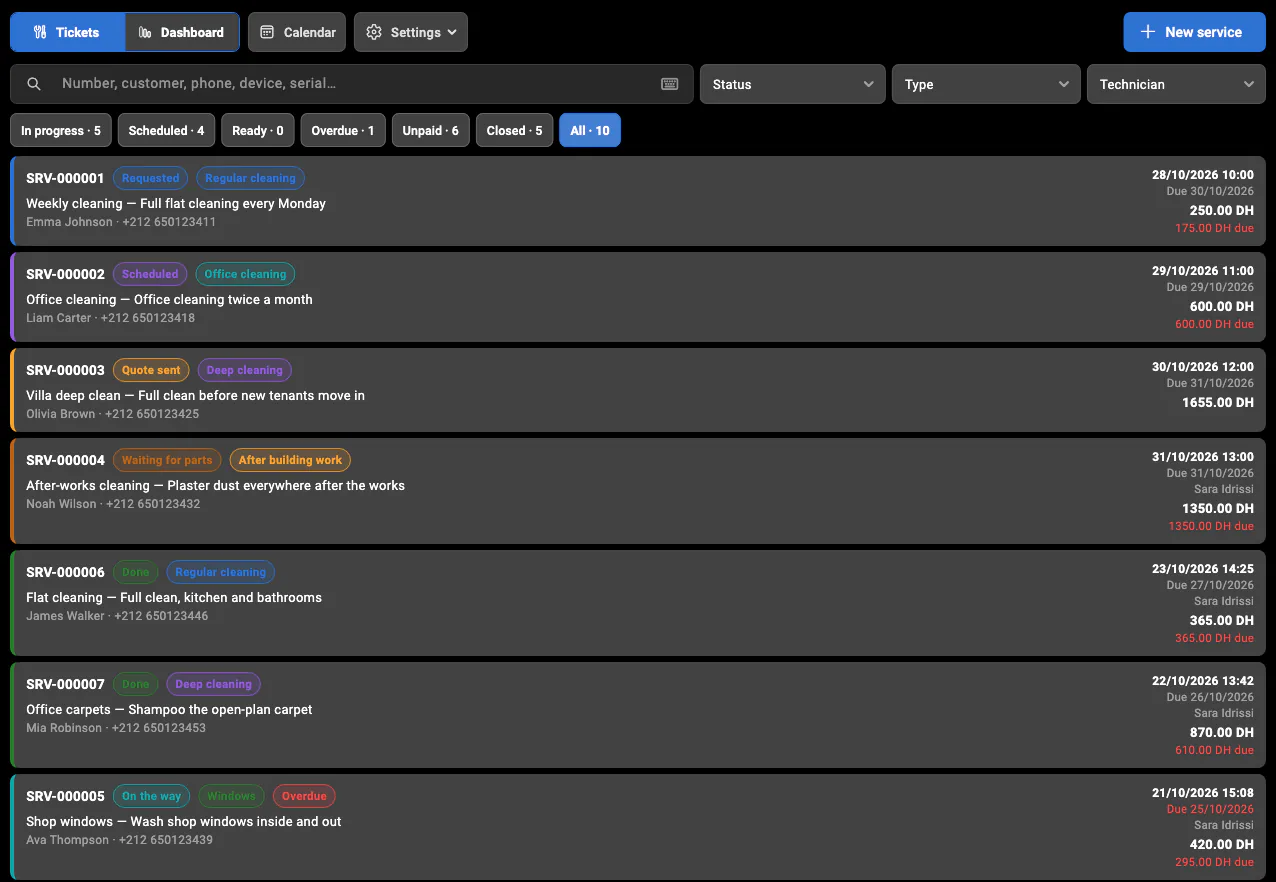
A cleaning business sells time at addresses: a flat every Monday, an office every evening, a deep clean after building works. BelloPOS Services records each job with the customer, the address, the area in square metres, the number of rooms and the frequency (once, weekly, every two weeks or monthly), and the type: regular, deep, office, end of works or windows.
Visits go on a calendar by day or week, per team member, and move with a drag. Products and materials used can come off stock, and the customer pays per visit or for the job. Carpet cleaning and pest control are set up too, with their own fields (the pest and the area treated) and follow-ups. It is part of BelloPOS Pro and works offline.
What you get
Area, rooms, frequency
The job carries the square metres, the number of rooms and how often it repeats, so the quote and the team match the work.
Teams on a calendar
Visits by day or week, filtered by team member; drag a visit to move it.
Products used
Cleaning products and materials come off stock as they are used, with a low-stock warning.
Paid and invoiced
Take payment per visit or per job, and invoice business customers in a numbered series.
See it in the app
Real screens from BelloPOS on Windows.
How a job goes
- 1Record the job: address, area, rooms, type, frequency.
- 2Quote and record the answer.
- 3Schedule the visit and assign the team.
- 4Clean, add the products used, mark it done.
- 5Take payment, and invoice if the customer is a business.
How Ethiopia pays, and how you record it
BelloPOS does not process payments and is not connected to telebirr, CBE Birr, M-Pesa, banks or card machines. The customer pays the way they always do, and you pick the payment method on the sale in BelloPOS, so every sale shows how it was paid. You can add your own payment methods to match how your shop gets paid.
- Cash in birr, with change shown on screen and a cash drawer
- telebirr, recorded as its own payment method
- CBE Birr and transfers from bank mobile apps, each added as a payment method
- M-Pesa Ethiopia and other mobile wallets
- Bank cards on your bank's own POS terminal, where you have one
- Any other method you take, added by you in a few clicks
- Credit (dubie) for regulars, settled at month-end or on salary day (Go plan)
- Accounts settled later by bank transfer for hotels, offices and NGOs (Go plan)
Because BelloPOS does not read your telebirr or bank statements, check the sales recorded under each method against the wallet or bank statement at closing. A gap usually means a payment was recorded under the wrong method.
Questions merchants ask
Can I handle regular contracts?
Each job records its frequency (weekly, every two weeks, monthly), and each visit is its own ticket on the calendar.
Does it work for carpet cleaning and pest control?
Yes. Both are set up in the Services module with their own fields: carpets collected and returned, or the pest and area treated, with a follow-up.
Can I invoice companies?
Yes. Jobs are invoiced in their own numbered series, with the customer’s company details.
Which plan is it in?
BelloPOS Pro and Pro+, with a 7-day free trial.
Other trades
All BelloPOS featuresRestaurants
Tables, the kitchen pass and fast service.
Cafes & coffee shops
Quick orders, the counter and the terrace.
Supermarkets & grocery
Barcodes, stock and busy checkouts.
Bakeries & pastry
Weigh, sell and keep up with fresh batches.
Fashion & apparel
Sizes, variants and seasonal collections.
Beauty & cosmetics
Brands, testers and loyal customers.
Bars & lounges
Rounds, tabs and a busy counter.
Convenience & general retail
Snacks, drinks and everyday goods.
Butcher shops
Sold by weight, cut by cut.
Parapharmacies
Dermo-cosmetics, baby care and supplements.
Stationery & school supplies
Back-to-school rush, item by item.
Electronics & phones
Phones, accessories and high-value tickets.
Home appliances
High-value sales, deposits and deliveries.
Furniture stores
Showroom sales, deposits and orders.
Auto parts
Thousands of references, found in seconds.
Hardware stores
Thousands of small items, trade prices and accounts.
Phone shops
Phones, accessories, repairs and customer history.
Shoe stores
Every size and colour with its own stock.
Toy stores
Fast checkout for the holiday rush.
Pet shops
Food by the bag or by weight, loyal regulars.
Opticians
Frames in stock, orders followed, deposits on account.
Jewelry stores
Every piece counted, instalments, full control.
Sports stores
Sizes, club prices and accounts.
Fast food
Fast counter orders, kitchen screen, delivery.
Pizzerias
Eat in, takeaway and delivery, with kitchen notes.
Phone & computer repair
Repair tickets, IMEI, quotes, parts and warranty.
Appliance repair
In the workshop or at home, with visits on a calendar.
Garages
Job cards with plate, mileage, parts and mechanics.
Car washes
Bookings or walk-ins, plates and vehicle sizes.
Laundries & dry cleaners
Tags, pieces, stains and pickup.
Hair & beauty salons
Appointments per stylist, allergies and products used.
Plumbers & electricians
Requests, visits, technicians and invoices.
Tailors
Alterations, measurements and fittings.
Pet grooming
Bookings, the pet’s card and boarding.
Software for cleaning businesses
Get started today and bring all your commerce into one platform.