BelloPOS for your trade
Free POS for convenience stores and general retail
Snacks, drinks, batteries and phone top-ups: a quick till for a shop that sells a bit of everything.
Free download for Windows · checking the latest release… · works offline
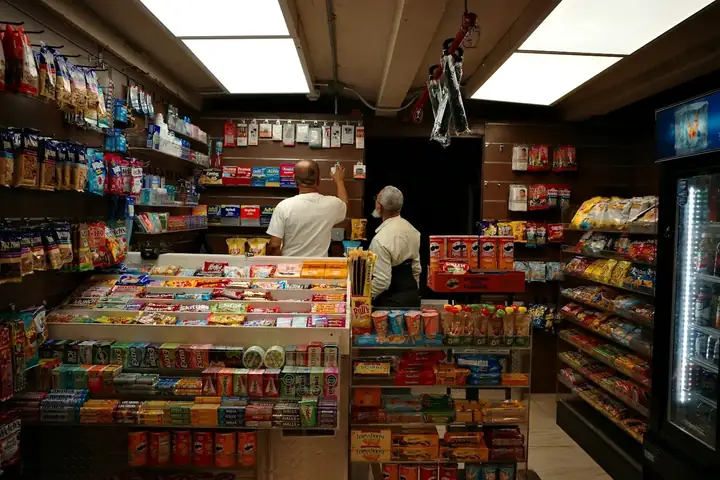
A neighbourhood shop sells hundreds of small things to people in a hurry. BelloPOS rings them up with a barcode scanner or a tap on the grid, totals the basket with the right tax on each line, and prints the ticket straight away. It runs on an ordinary Windows PC or Mac and keeps selling with no internet at all.
Choose "General retail" at setup and the demo database is filled with snacks, drinks, household goods and accessories, named in your language and priced in your currency, so the shop looks like yours from the first minute. Low-stock alerts then tell you what to reorder before the shelf is empty.
What you get
Scan or tap, then pay
Any USB barcode scanner works out of the box, and items without a barcode sit one tap away on the grid.
Stock alerts
Set a minimum for each product and see what is running low before the weekend rush, not after.
Barcode labels
Print your own labels for loose or unlabelled goods, with name and price, from the same app.
Know your best sellers
Reports show what sells, what sits on the shelf and the margin on each, so you buy on numbers instead of habit.
See it in the app
Real screens from BelloPOS on Windows.
Your demo catalogue, ready at setup
Choose this activity when you install BelloPOS and these categories and products are created for you, in your language and currency. Rename, reprice or delete them whenever you like.
- 1Install BelloPOS and choose your language and country.
- 2Pick "Try with demo data", then your activity.
- 3Start selling on a catalogue that already looks like your shop.
Convenience & general retail
4 categories · 17 products
Snacks and sweets
- Crisps 150 g$0.90
- Chocolate bar$0.60
- Filled biscuits$0.50
- Chewing gum$0.30
Drinks
- Water 50 cl$0.30
- Soda can$0.70
- Energy drink$1.50
- Fruit juice 25 cl$0.50
Household
- AA batteries x4$2.50
- LED bulb$2.00
- Bin bags x20$1.20
- Lighter$0.50
- Sponges x3$0.80
Accessories
- USB charger$4.50
- USB-C cable$3.00
- Phone top-up card$2.00
- Folding umbrella$5.00
Example prices in US dollars; the app converts them to your currency.
Download nowHow a sale goes
- 1Scan the items or tap them on the product grid.
- 2The total appears with tax per line; take cash or card.
- 3Print the ticket and the drawer opens on cash.
- 4Stock comes down with every sale and low items are flagged.
- 5Close the day and check the best sellers report.
A retail POS for Canadian independent stores
Gift shops in Banff, hardware stores in small Saskatchewan towns, bookshops in Ottawa's Glebe and dollar stores in suburban strip malls share the same problem: hundreds or thousands of products, a small team and little time to spare. BelloPOS gives them a fast checkout and a full inventory system on the Windows PC or Mac they already own. Scan or search a product, take payment on your existing debit terminal, and print a receipt with your business name and GST/HST number. Stock drops with each sale, and low-stock alerts tell you what to reorder before the shelf goes empty during the holiday rush.
Retail in Canada means different tax rules depending on where you are: GST in Alberta, HST in Ontario, GST plus PST in British Columbia. Set the rates you use and give each product the right one. For a store that sells to contractors or other businesses, wholesale price groups apply trade prices automatically and customer accounts track what is owed. Print barcode labels for consignment or unlabelled items, export invoices to PDF for larger orders, and let Ares, the AI assistant, tell you which lines are moving and which are gathering dust. Pro and Pro+ include setup done for you.
How Canadians pay, and how BelloPOS records it
Keep the payment terminal you already have from your bank or processor. BelloPOS records every method next to the sale, so your end-of-day totals match what landed in the bank.
- Interac debit, inserted or tapped
- Tap to pay with a card, phone or watch (Apple Pay, Google Pay)
- Visa, Mastercard and American Express credit cards
- Cash, with change worked out at the till
- Interac e-Transfer for deposits and invoiced orders
- Split payments, for example part cash and part debit
- Customer credit and house accounts for regulars and trade buyers
BelloPOS does not process card payments itself and is not connected to Moneris, Square or any other processor. You take the card on your own terminal and select the method in BelloPOS.
Retail POS questions
How many products can I manage?
BelloPOS is built for shops with large catalogues: thousands of products with barcodes, categories, brands and suppliers. You can import your list or, with Pro and Pro+, let us add your products as part of the Ready-to-Sell Pack. Stock levels update with every sale and every delivery you receive against a purchase order.
Can I give contractors or businesses their own prices?
Yes. Wholesale price groups let you set a separate price list for trade customers. Select the customer at the till and their price applies automatically. Combine it with customer accounts to let them buy now and pay later, and send PDF invoices that include the buyer's name, a description and payment terms.
Does it print barcode labels?
Yes. Print barcode and price labels for any product directly from BelloPOS, which is handy for consignment items, products from small local makers or anything that arrives without a scannable code. Labels work on standard label printers, and the codes scan straight back into the checkout.
Can I see what sells best before reordering?
Yes. Reports show best-sellers, sales by period and slow-moving stock. You can also ask Ares, the built-in AI assistant, questions in plain English, such as which products sold most in November, and get the answer from your own sales data before you place your next order.
Will it work for a store in Quebec?
Revenu Québec's mandatory billing measure described here targets restaurants and bars rather than retail stores, so BelloPOS can generally be used to sell, track stock and print receipts. You still charge GST and QST and keep proper records. BelloPOS is not certified by Revenu Québec, so ask your accountant to confirm your setup.
Other trades
All BelloPOS featuresRestaurants
Tables, the kitchen pass and fast service.
Cafes & coffee shops
Quick orders, the counter and the terrace.
Supermarkets & grocery
Barcodes, stock and busy checkouts.
Bakeries & pastry
Weigh, sell and keep up with fresh batches.
Fashion & apparel
Sizes, variants and seasonal collections.
Beauty & cosmetics
Brands, testers and loyal customers.
Bars & lounges
Rounds, tabs and a busy counter.
Butcher shops
Sold by weight, cut by cut.
Parapharmacies
Dermo-cosmetics, baby care and supplements.
Stationery & school supplies
Back-to-school rush, item by item.
Electronics & phones
Phones, accessories and high-value tickets.
Home appliances
High-value sales, deposits and deliveries.
Furniture stores
Showroom sales, deposits and orders.
Auto parts
Thousands of references, found in seconds.
Hardware stores
Thousands of small items, trade prices and accounts.
Phone shops
Phones, accessories, repairs and customer history.
Shoe stores
Every size and colour with its own stock.
Toy stores
Fast checkout for the holiday rush.
Pet shops
Food by the bag or by weight, loyal regulars.
Opticians
Frames in stock, orders followed, deposits on account.
Jewelry stores
Every piece counted, instalments, full control.
Sports stores
Sizes, club prices and accounts.
Fast food
Fast counter orders, kitchen screen, delivery.
Pizzerias
Eat in, takeaway and delivery, with kitchen notes.
Phone & computer repair
Repair tickets, IMEI, quotes, parts and warranty.
Appliance repair
In the workshop or at home, with visits on a calendar.
Garages
Job cards with plate, mileage, parts and mechanics.
Car washes
Bookings or walk-ins, plates and vehicle sizes.
Laundries & dry cleaners
Tags, pieces, stains and pickup.
Hair & beauty salons
Appointments per stylist, allergies and products used.
Plumbers & electricians
Requests, visits, technicians and invoices.
Cleaning companies
Jobs by area and rooms, teams on a calendar.
Tailors
Alterations, measurements and fittings.
Pet grooming
Bookings, the pet’s card and boarding.
Free POS for convenience stores and general retail
Get started today and bring all your commerce into one platform.