Software for repair and service businesses
Included in BelloPOS Pro
A phone left for repair, a haircut booked for 10 o'clock, a leak to fix at a customer's: one ticket per job, one number, nothing lost.
Free download for Windows · checking the latest release… · works offline
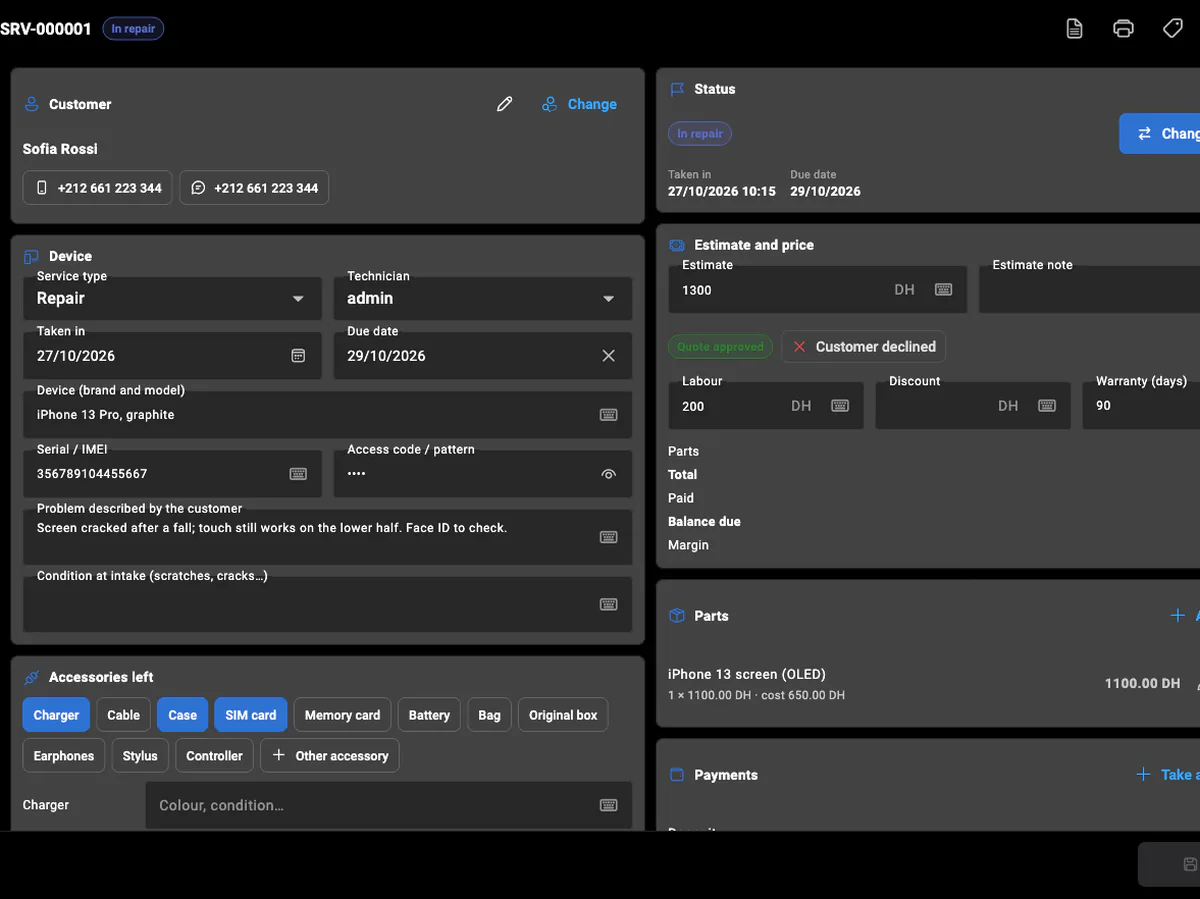
A service business does not sell a product: it takes something in, books a time or goes to an address, and delivers the work. BelloPOS Services gives every job a ticket with its own number: the customer and their phones (WhatsApp included), what was left and what came with it, the problem as they described it, the estimate and their answer, the parts used, the deposit and the payments. Each status change is kept in the ticket's history, so anyone at the counter can answer "where is my phone?" in seconds.
It is set up for your trade: electronics, phone and computer repair, garages, laundries, beauty salons, plumbers, electricians, cleaning, car washes, locksmiths, air-conditioning, tailors, pest control, moving, handymen, pet grooming, delivery, carpet cleaning or gardening. Each one gets the fields it needs (a plate and mileage for a car, a tag and pieces for a laundry, an address and a visit date for a plumber) and its own statuses. Services are in BelloPOS Pro and Pro+, on their own tab and dashboard, apart from your sales; cash taken goes into the same cash drawer.
What it does
One ticket per job
A numbered ticket with the customer, the item, its serial or plate, the access code (masked, never printed), the problem, the condition at intake and the accessories left with it.
Quote, parts and payments
Send an estimate and record the answer, add parts from your own list (stock goes down when they are used), take a deposit, then the balance at pickup.
Printed ticket and label
Print the customer's ticket with a barcode and QR code of the number, and a label to stick on the item. Choose what each prints in the settings.
Ready, delivered, under warranty
Tell the customer it is ready on WhatsApp in one tap. Delivery starts the warranty, and a returning serial or plate is recognized as a warranty return.
A calendar of visits and due dates
Appointments, visits and due dates by month, week or day, filtered by technician or status, with each technician's load per day. Drag a ticket to another slot to reschedule it; the move is kept in its history.
Invoices for the work
Issue an invoice from the ticket, numbered in its own series (FS-2026-000001), with the VAT of the service type and the total in words. Once issued it never changes; a credit note cancels it.
See it in the app
Real screens from BelloPOS on Windows.
How it works, step by step
- 1Take the item in: choose or create the customer, describe the device or the job, tick what was left with it.
- 2Print the ticket for the customer and the label for the item.
- 3Diagnose, send the estimate and record whether the customer accepts it.
- 4Repair: add the parts used and move the ticket through your statuses.
- 5Mark it ready and send the WhatsApp message, then take the balance and hand it back.
Questions merchants ask
Which plan includes Services?
BelloPOS Pro and Pro+. It is off until you switch it on in Settings → Services, or say at setup that you offer services. The 7-day free trial includes it.
Does a repair count as a sale?
No. Services have their own tab, payments and dashboard, so your sales figures stay clean. Customers are shared, and cash taken for a repair goes into the same cash drawer, so the end-of-day count is right.
Is it only for phone repair?
No. There are 19 trades, from garages and laundries to salons, plumbers and movers. Each brings its own fields, statuses and lists, and you can rename or add statuses, service types and accessories in Manage.
Can I track the stock of my parts?
Yes. Each part can track its stock with an initial and a minimum quantity. Adding it to a ticket takes it out; removing it or canceling the job puts it back. Parts running low show on the dashboard.
Does it work offline?
Yes, like the rest of BelloPOS: the tickets are on your own computer or tablet, and several registers on the network share them.
Can technicians work from their phone?
Yes, with the staff phone app included in Pro. On the shop's Wi-Fi, a technician opens the Services tab on their phone to take a device in, add photos from the camera, change the status, add parts and payments, record the answer to the quote and print the ticket or label on the register's printer. Everything is recorded in their name, within their role's permissions.
Can I invoice a repair?
Yes. The Invoice button on a ticket issues an invoice with its own numbering, separate from your sale invoices. It takes the VAT out of the ticket's total at the rate of its service type and prints the total in words where your country expects it. To correct one, issue a credit note and invoice again.
Can I add my own fields to a ticket?
Yes. In Manage → Service custom fields, add what your trade needs (color, insurance claim, ring size…) as text, a number, a date, yes/no or a list of choices, for every service type or only some. A field can be required, printed on the intake ticket and searched.
Other BelloPOS features
Every module, one page each.
Touchscreen POS software
The register screen your staff will actually use: one tap per item, one second per payment, and nothing waiting on a connection.
Stock management software
Every sale and every delivery moves the count, so what the screen says is what is actually on the shelf.
Barcode and label software
Any scanner works out of the box, and anything without a barcode gets one you print yourself.
Invoicing and receipt software
A thermal ticket for the queue, a proper PDF invoice for the customer who asks, both out of the same sale.
Customer management software
Know who is in front of you, what they bought last time, and the details their next invoice needs.
Customer credit and account statements
Set the limit before the sale, follow every debit and payment, and hand the customer a statement that adds up.
Purchasing and supplier software
Record what arrived and what you paid, then let stock, cost prices and supplier history update together.
Sales reporting software
What sold, what earned, who sold it and what to order next, without exporting anything to a spreadsheet.
Restaurant POS software
The floor, the pass and the bill on one system, still running when the line goes down mid service.
Offline POS software
Not an offline mode that catches up later: the software simply runs where your shop is.
Multi-register POS software
One PC holds the data, the other terminals talk to it over your own network, and nothing leaves the building.
Staff accounts and permissions
Everyone gets their own login, each role gets exactly the buttons it should have, and the history says who did what.
Software for repair and service businesses
Get started today and bring all your commerce into one platform.